A full week of planning saves a month of regression bugs.
With last weeks being full of conceptualizations and a wish list the size of a back to school supplies list we had a lot of work to get all of this managed in the correct way. Knowing what you want to happen in your application and planning how it will actually happen is the key to a successful development. Every item on the wishlist becomes a feature and each of those features require a plan to implement.
This week was about creating that plan.
Turning Features Into Requirements
The largest task this week was figuring out the features that Kin Kitchen was going to have so it can do what I envisioned it to do. How do you make sure that you don’t miss a feature? With user stories. Here is an example of a user story that was used for this app. It lists the feature and then the requirements that have to be implemented to make this feature a reality. An easy workflow when you look at it.
User Story → Feature → Requirements
User Story:
As a guest, I want to select what I am bringing to a gathering so that everyone can see what food is planned.
Feature:
Gathering Dish Contribution
Requirements:
- The application must allow guests to add or claim a dish.
- The application must display who is bringing each dish.
- The application must allow a dish to be linked to an existing recipe.
- The application must allow dish needs such as refrigeration or electricity to be identified.
- The application must allow required supplies such as serving utensils to be identified.
When we look at the simplicity of one item we start to see features that we need to build and some requirements that can but utilized by multiple features. A list of these user stories that encompass all aspects of the app matched with features identified and requirements listed give us a great starting point for planning out the rest of the build.
After seeing the length of the list that we just made it can become overwhelming as to what should i start with first. Thats where we look into the stages. What is the Minimum Viable Product (MVP)? Is this considered what can be seen as a functional app or is this the “Bare minimum” for what you wanted your vision to do. Im my opinion the MVP is the minimum set of features to be deemed useful by a user who just discovers the tool. This way if something happens between MVP Alpha and Beta there is still a project you can show the world or use as concept to gain founding for.
Next we have the other sections of Alpha and Beta. The two last sections that need to be done to get the core concept of the application up and going for a happy release.
With those established I could now move on to the next stage of planning how you would navigate through the application.
Mapping the User Experience
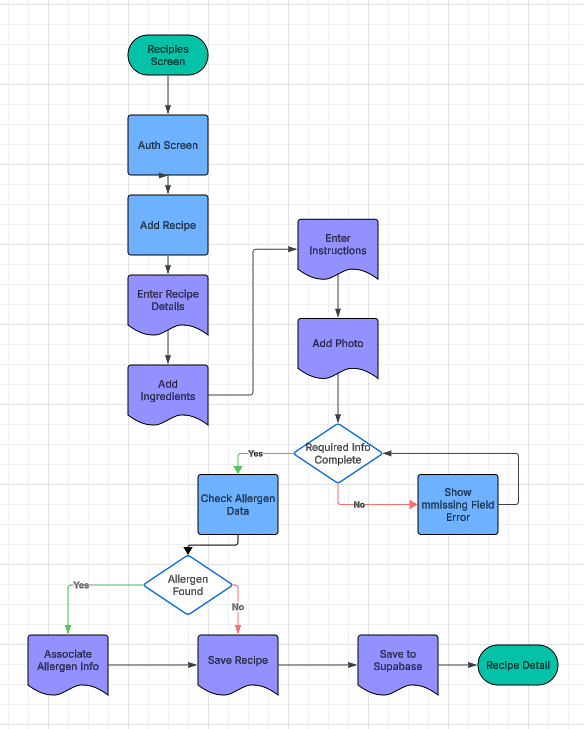
The workflows is a great way to see visually what views are going to be needed and what functions are repeating and can be in a global or higher level helper file. Above is one of the workflows i amde but all together there were 6 as listed below:
- Creating an account and dietary profile
- Creating a recipe
- Creating a gathering
- Participating in a gathering
- Sharing a recipe and checking for dietary conflicts
- Creating and organizing a cookbook
These workflows allow us to see other features that may need to be added in, and some times the requirements them selves change or get added to. When I was working out the Gathering workflow it became apparent how in depth we are going to have to rely on the allergen alert workflow which needs to be an element of the application that is robust and error free.
Designing the Data Behind Kin Kitchen
Cloud storage on mobile is a must. Where do we go for thsi cloud storage. My favorite solution for this is Supabase. The ability to build profiles while implementing authentication and storage buckets all in one place make this a no brainer for this.
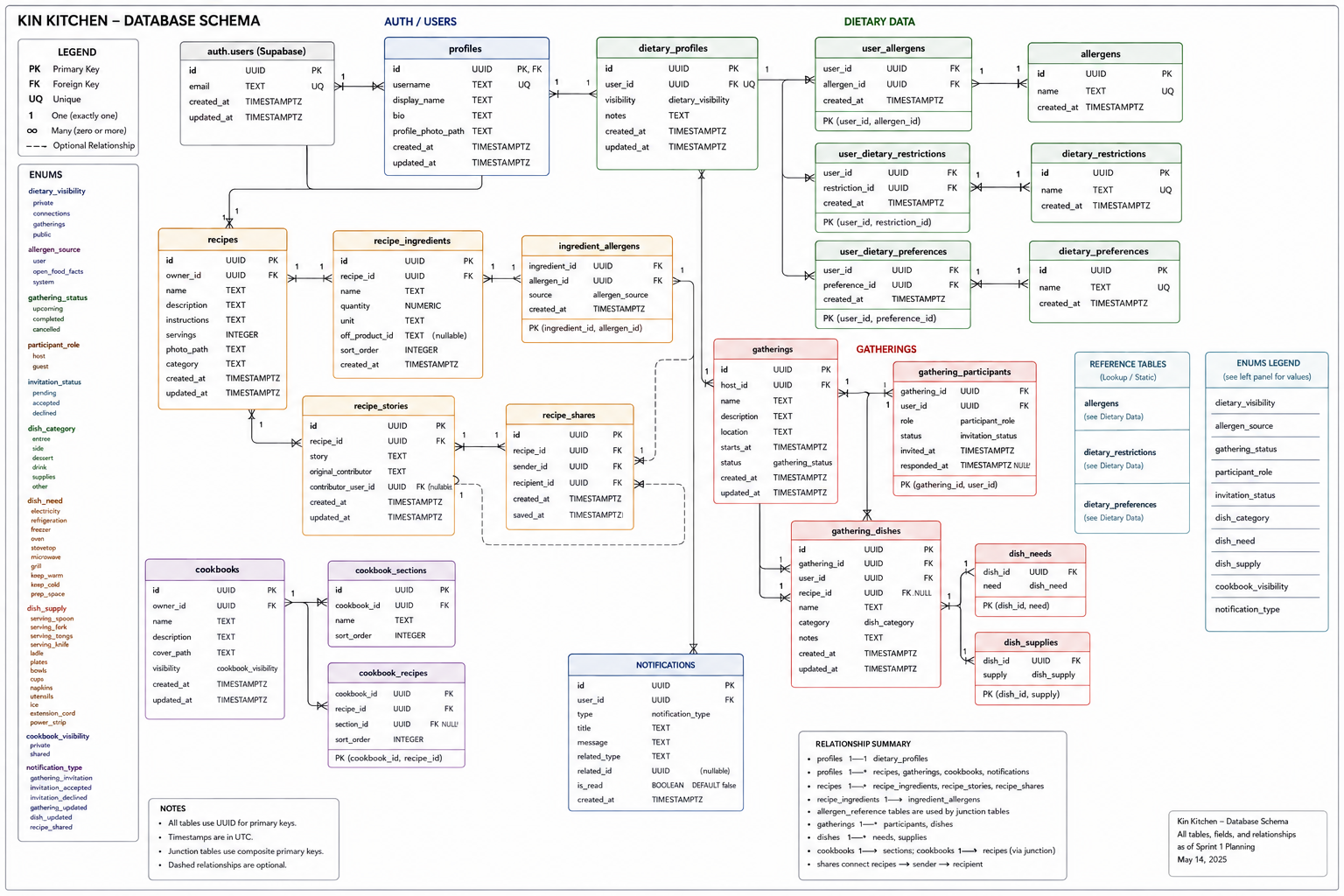
Breaking down the needs for the data fields and tables became large project in itself that was checked for efficiency with AI. Thankfully I was able identify some issues with my planning and fixed those gaps and design flaws to make this ready for expansion and the lightest version needed compartmentalized effectively.
The current Kin Kitchen schema connects authentication, user profiles, dietary information, recipes, ingredients, allergens, gatherings, participants, dishes, cookbooks, recipe sharing, and notifications through Supabase and PostgreSQL.
From Architecture to Wireframes
Once the requirements, use cases, and database structure were established, I moved into Figma and started creating the first Kin Kitchen wireframes.
These are intentionally low-fidelity. Right now, I care more about information hierarchy and user flow than colors, typography, or polished graphics. I want to make sure that I have a clear vision of what each model will look like along with what elements are intuitive to the user.
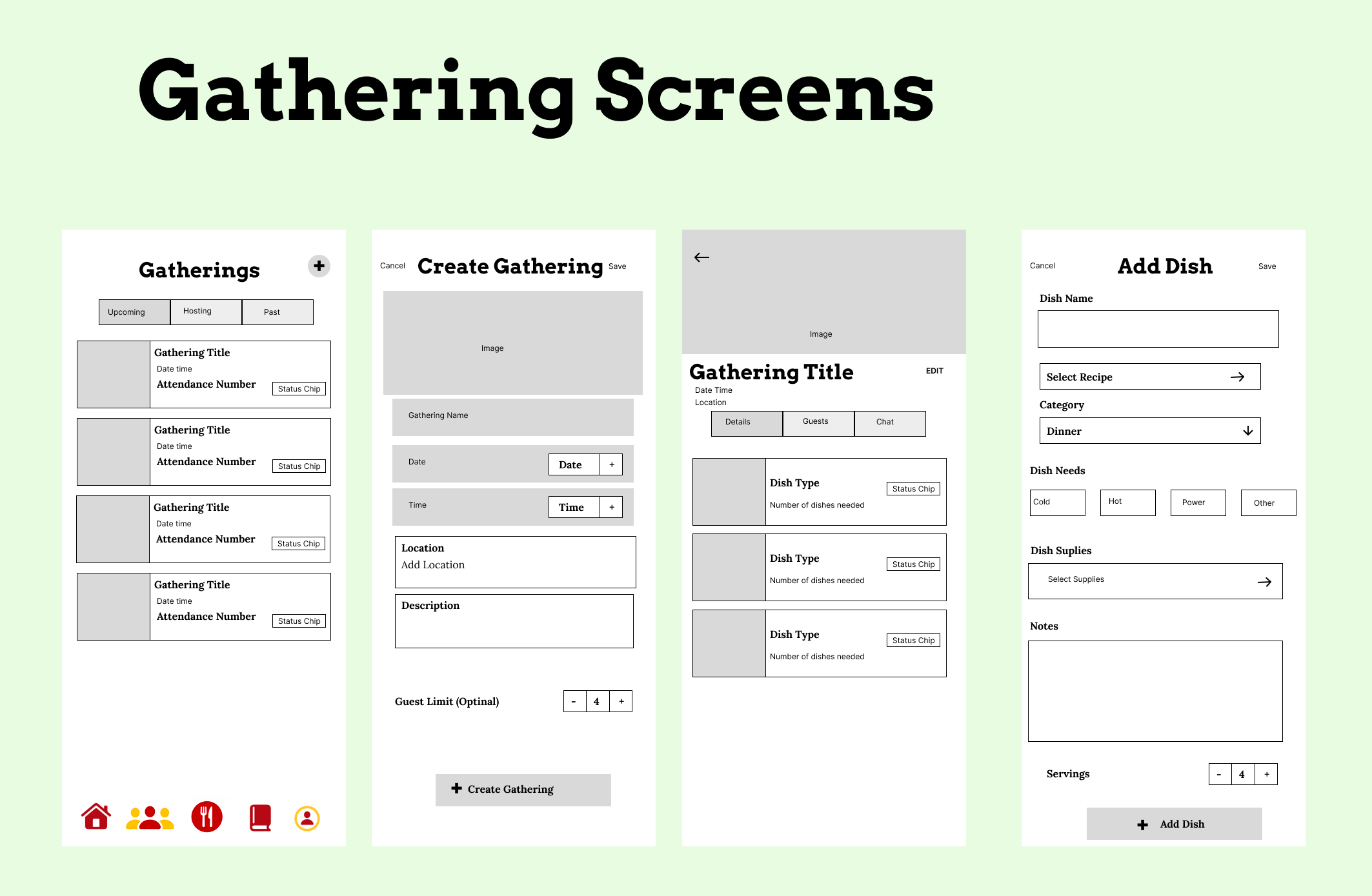
While this was one of my least favorite parts of planning, wire-framing has quickly become one of my most enjoyable part of planning. We now know what elements we can reuse over and over again and how to built them properly in the Swift resources file. A button that needs text and is a certain color that is used in multiple screens has now found its own function in swift which has the text element. A great design tool that helps you revise the resources file.
Ready Set Sprint
This week we also planned our first sprint in Jira where we were able to estimate time for each of the items on the first sprint and effectively plan out our first sprint in a realistic time layout. The task of putting in each of the tasks with the criteria for what should be completed and what testing is needed to verify that the tasks were complete took a bit of time as well. These descriptions allowed me to know what kind of timeline was needed for each task and each milestone as well.
What We Accomplished This Week
This was primarily a planning and design week, but a lot of the foundation for Kin Kitchen is now complete.
- Completed the Kin Kitchen software design document
- Defined MVP requirements
- Defined Alpha requirements
- Defined Beta requirements
- Established Version 2.0 feature goals
- Defined the application’s major user stories
- Created six detailed use cases and user flows
- Defined the primary Kin Kitchen user personas
- Finalized the initial Kin Kitchen design system
- Defined the primary five-tab navigation structure
- Planned the Home interface
- Planned the Gathering Detail interface
- Planned the Recipe Detail interface
- Defined reusable SwiftUI components
- Defined KinColor
- Defined KinTypography
- Defined KinSpacing
- Defined KinRadius
- Defined the Kin Kitchen SF Symbols/icon set
- Established the planned Xcode folder hierarchy
- Defined the Supabase/PostgreSQL database architecture
- Completed the Entity Relationship Diagram
- Added dietary profiles, allergens, restrictions, and preferences to the data model
- Designed recipe and ingredient relationships
- Designed ingredient-to-allergen relationships
- Designed gathering participants and invitation states
- Designed gathering dishes
- Added dish needs and dish supplies
- Added optional links between gathering dishes and saved recipes
- Designed cookbook, cookbook section, and recipe relationships
- Designed recipe sharing and attribution
- Planned application notifications
- Defined the Git/GitHub integration workflow
- Established feature and development branch practices
- Created the code review plan
- Created the testing and regression-testing plan
- Defined Jira as the project’s issue and bug tracking system
- Began the first Figma wireframes
- Wireframed authentication and onboarding
- Wireframed the Home screen
- Wireframed recipe workflows
- Wireframed gathering workflows
- Wireframed cookbook screens
- Wireframed profile and dietary-profile screens
Seeing that list written out makes it pretty clear that this week wasn’t just documentation.
We built the blueprint, and have a pretty clear path to success.
What’s Next?
Refining the wireframes so that we can see the actual vision of the app will help us realize what elements we can reuse to establish uniformity and branding look across all views.
Another thing that needs to be addressed is ensuring that the Dietary needs / allergies alerts are listed as a safety measure but now to be taken as the only warning. Dietary needs should be the responsibility of the user although quickly identifying known allergies is a small feature to make life easier.
>_ discussion
Comments
Questions, thoughts, or a better way to solve the problem? Join the discussion.