From an Idea to an Actual App
The last time I wrote about Kin Kitchen, we were setting the foundation.
The idea was there. The features were planned. The database was being mapped out. But there is a pretty big difference between knowing what you want an app to do and actually having something running on an iPhone.
That changed during this sprint.
Kin Kitchen now has a working application structure, authentication, persistent user profiles, dietary profiles, a connection to Supabase, reusable UI components, and the beginnings of the workflows that will eventually power recipes, gatherings, and family cookbooks.
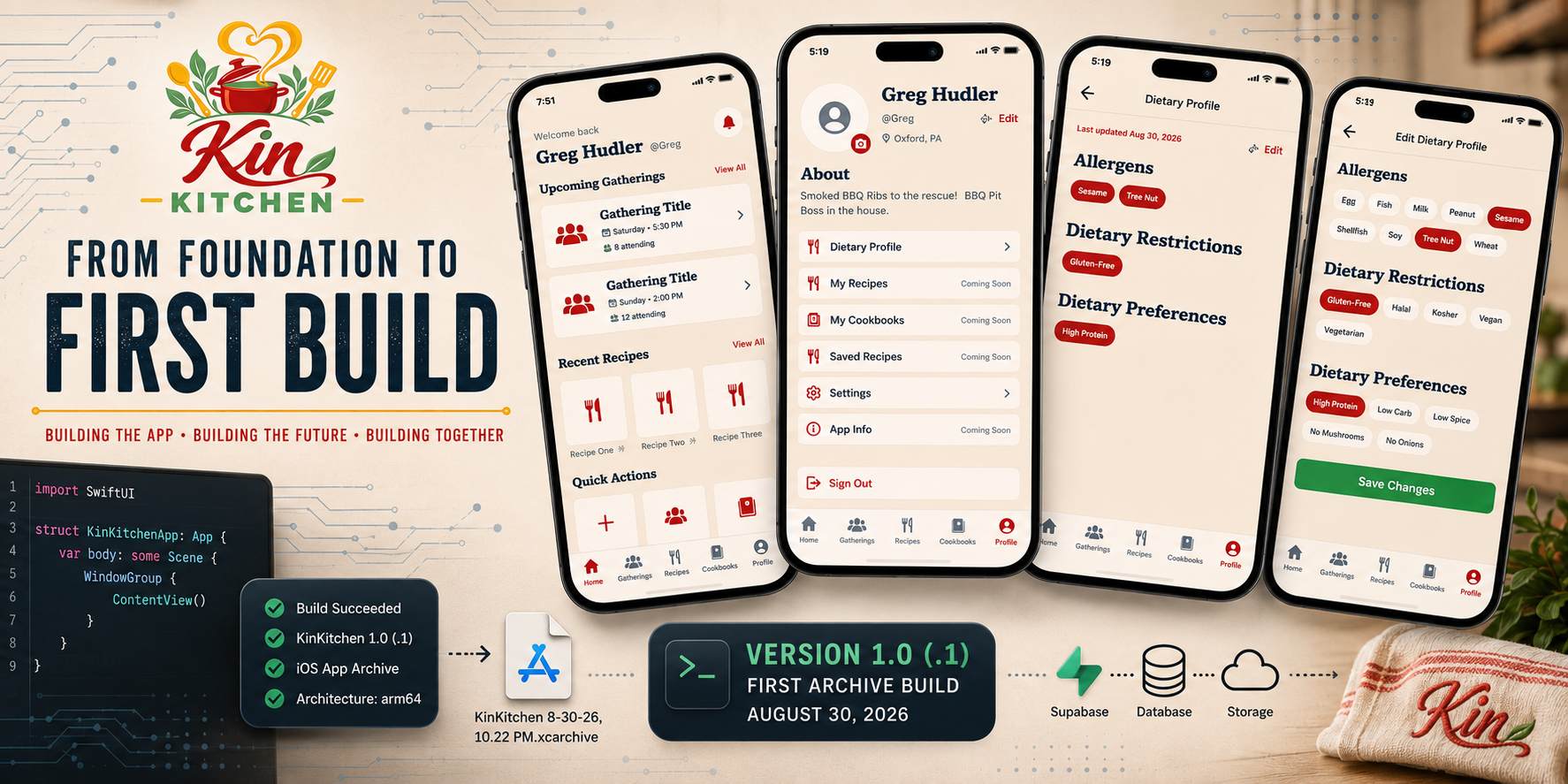
And after a lot of building, testing, breaking things, and fixing them again, Kin Kitchen officially has its first archived iOS build.
Building the Kin Kitchen Design System
One thing that I learned is once the design system is created it begins to become much faster to prototype, mock up new pages, and test user flows in xCode. This week I have gotten the whole design system added as swift components listed here below.
That design system now includes:
- Colors
- Typography
- Spacing
- Corner radiuses
- Icons
- Buttons
- Text fields
- Secure fields
- Text editors
- Search bars
- Cards
- Chips and badges
- Photo pickers
- Loading states
- Error states
- Empty states
- Navigation components
- A custom tab bar
I also added Arvo and Lora as the primary typefaces for the app.
This took some extra time upfront, but it has already made building new screens considerably faster. Instead of redesigning a button every time I need one, I can use the same component and know it will match the rest of Kin Kitchen.
Data stored, Data retrieved, Data Secured with Supabase!
Building the UI it nice and pretty to look at but the main source of truth is the backend DB and User Auth system. The core of the app is sharing data so a robust and expandable data schema was one of the top priorities to implement from the ground up ensuring that we knew what was coming next week as well as next month and preparing our infrastructure to handle it.
The database structure is in place for the larger Kin Kitchen ecosystem, while the iOS app is beginning to consume those services one feature at a time. We are looking into implementing an Andriod version in parallel with iOS soon.
I also configured Row Level Security so users can only access the information they are supposed to have access to.
Storage has been established for things such as:
- Profile photos
- Recipe photos
- Cookbook covers
That means we’re no longer designing screens around imaginary data. The application is beginning to work with real accounts and persistent information.
Authentication and First Login
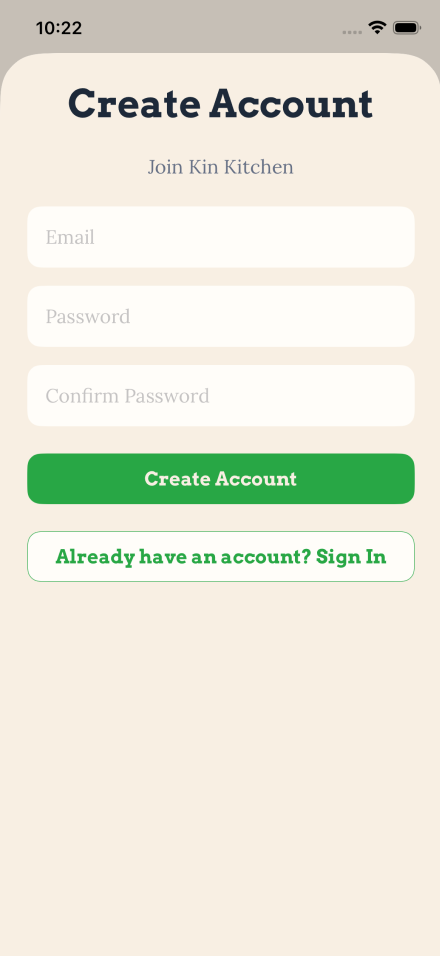
Users can now create an account, sign in, sign out, and return to an existing session.
But simply creating an account isn’t enough for Kin Kitchen.
The application needs to know who you are before it can start helping coordinate meals and understand dietary needs.
That led to the creation of a new first-login onboarding system.
A new user is now walked through creating their profile with information including:
- First and last name
- Username
- Birthday
- Location
- Short bio
- Profile photo
Usernames are checked for availability and stored uniquely so they can eventually become an important part of connecting people throughout Kin Kitchen.
The onboarding system can also recognize an incomplete existing profile and ask only for the information that still needs to be completed.
Dietary Information Gets Its Own Home
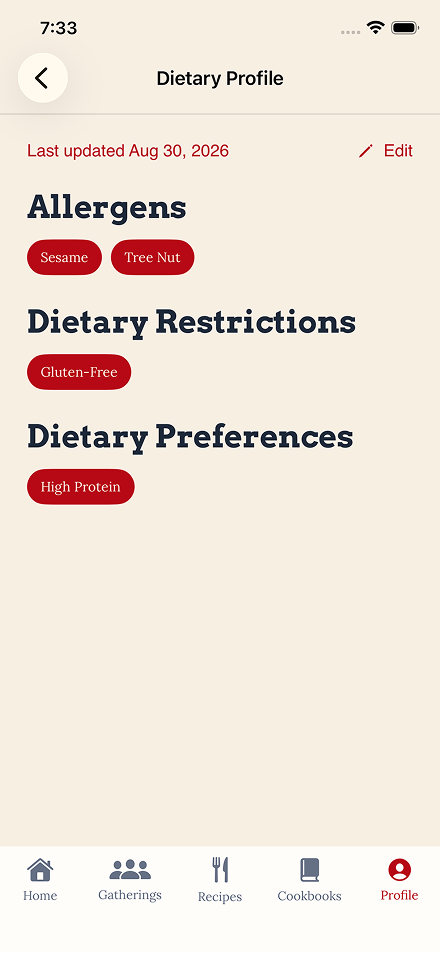
Dietary information is one of the pieces of Kin Kitchen that I don’t want treated like an afterthought.
The entire point of coordinating meals is making sure the people attending can actually eat the food being prepared.
Instead of cramming dietary information onto the normal user profile, I separated it into a dedicated Dietary Profile.
Users can now maintain:
- Allergens
- Dietary restrictions
- Dietary preferences
The main Dietary Profile is intentionally read-only. When someone wants to make a change, they enter a dedicated editing screen, make their selections, and save them.
I also added a timestamp to record when the dietary profile was last reviewed. The long-term idea is that Kin Kitchen can periodically ask users to confirm that their information is still accurate. Allergies and dietary restrictions aren’t necessarily something someone enters once and never thinks about again and we all know as we get older we become more aware of our own dietary needs.
That gives us a much stronger foundation for eventually warning hosts about conflicts between the food being planned and the dietary needs of their guests.
Building the User Profile
The Profile screen got a lot of attention this week, since it will be acting as the hub for a few different key aspects of teh application it has morphed into almost a settings screen. But we don’t like settings taking up valuable space on our navbar so we designed the Profile bar to be designed around the persons profile not the apps settings.
The profile shows the user’s photo, name, username, location, and bio while providing dedicated areas for things like:
- Dietary Profile
- My Recipes
- My Cookbooks
- Saved Recipes
- Settings (small option)
- App Information
Some of those features aren’t implemented yet, and that’s intentional.
Rather than building half-working versions of future features just to fill the screen, those areas are clearly marked as coming soon until their respective development sprints begin.
Light Mode, Dark Mode, and Settings
Kin Kitchen also has its first application settings.
Users can switch between Light Mode and Dark Mode, and the preference persists between launches.
This was a relatively small feature compared to authentication or the backend work, but it helped prove that the application-level settings architecture is working before more preferences are added later.
And Then We Found the Bugs
Of course, no sprint ends without finding something that makes you wonder how you missed it.
During final regression testing, I discovered that usernames weren’t appearing during profile setup.
One missing UI section made an entire feature look broken.
It was a good reminder of why the final regression pass matters.
The username field was restored, the onboarding flow was tested again, and the fix was committed before preparing the build.
Fixing the Things You Don’t See
There was also a fair amount of work this sprint that users hopefully never notice.
Navigation transitions between some Profile screens were producing strange white areas along the sides of the screen.
After tracing the issue through several views, the problem turned out to be the shared loading component. It wasn’t filling the available screen during navigation transitions. Fixing the component fixed the issue everywhere it was being used.
I also changed how the main tab views are managed. Previously, switching away from Profile and coming back could recreate the screen and reload its data. The main tabs now remain alive while navigating between them, which makes the application feel significantly more responsive.
Neither change makes for a flashy feature screenshot. Both make the app feel considerably better.
Designing What’s Coming Next
Not everything built during this stage belongs in the production application yet.
I created a separate local development branch specifically for UI experimentation.
This lets me use the real Kin Kitchen design system to rapidly build screen mockups without connecting them to production logic or the backend.
The branch currently explores workflows for the three major areas coming next.
Recipes
The recipe designs include recipe browsing, recipe details, adding recipes, ingredients, instructions, notes, favorites, filtering, and eventually adding recipes into cookbooks.
Gatherings
The gathering designs cover creating gatherings, viewing gathering details, adding dishes, managing guests, guest information, chat, attendance, and tracking which dishes still need someone to bring them.
>_ discussion
Comments
Questions, thoughts, or a better way to solve the problem? Join the discussion.