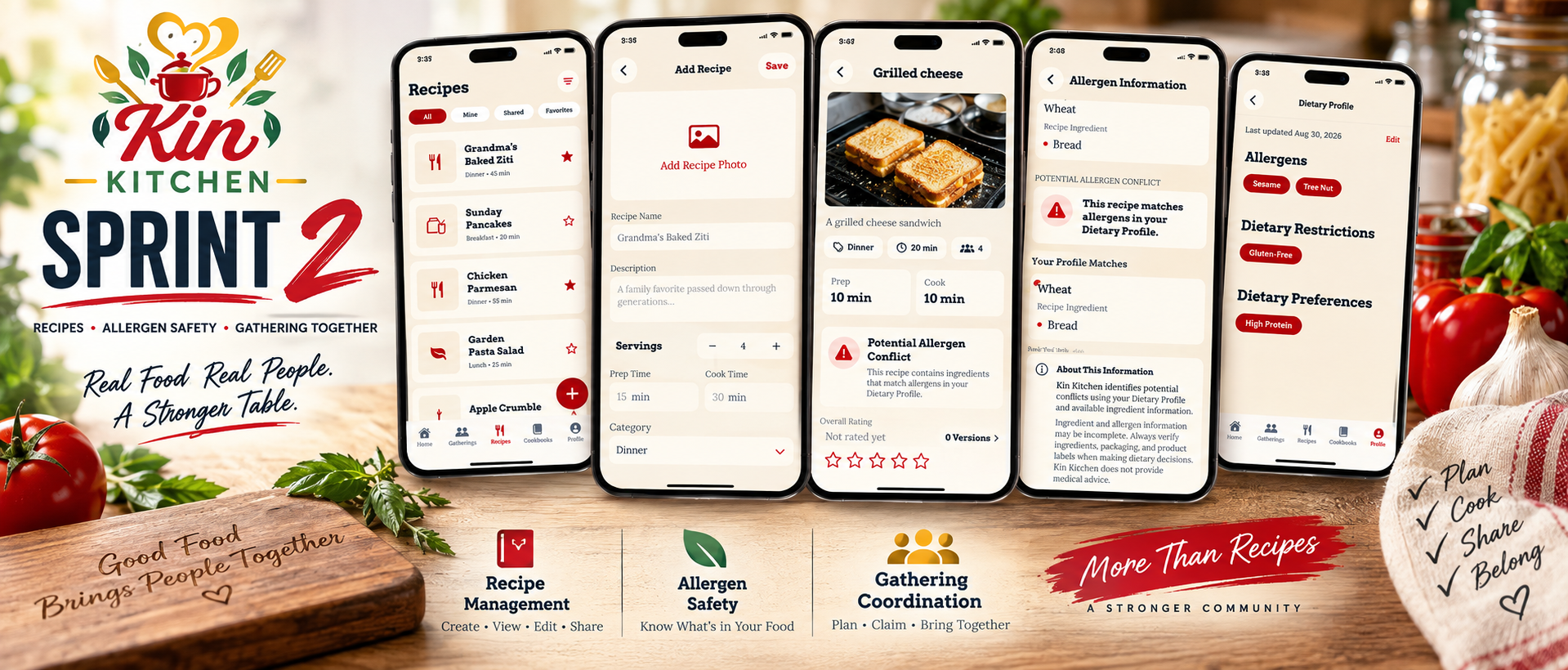
Sprint 2 Comes to a Close: Recipes and Gathering Coordination
This week brought the completion of three major pieces of Kin Kitchen: the core recipe system, Allergen detection and warning, and a functional gathering experience.
Users can now create, view, edit, and delete recipes, manage ingredients, and upload photos for their recipes. This gives Kin Kitchen a complete recipe foundation that can now be used throughout the rest of the application.
Those recipes will check their dietary profiles and flag any Allergens that are verified. It will also mark ingredients that were not able to be verified for allergens as a warning.
The gathering system Was also
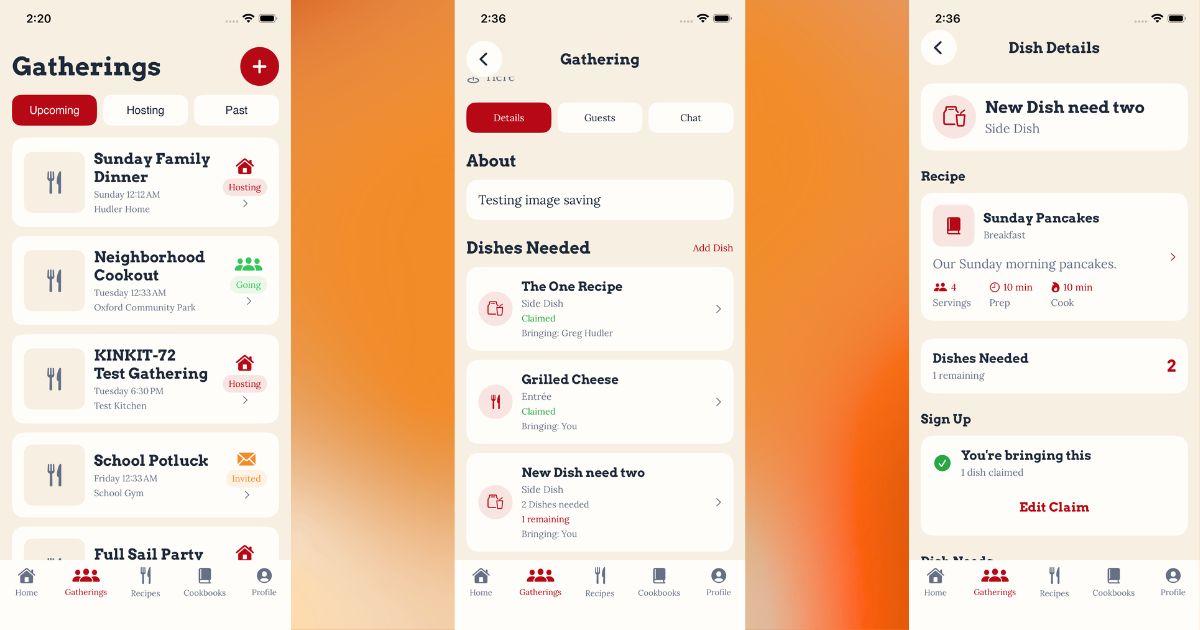
Participants can now claim dishes that a host has requested, see how many dishes are still needed, and see who has already volunteered to bring something.
Together, these additions move Kin Kitchen beyond simply storing recipes or planning what food is needed. Recipes and gatherings are beginning to work together to coordinate the people, food, and recipes that make up a community meal.
Building the Recipe System
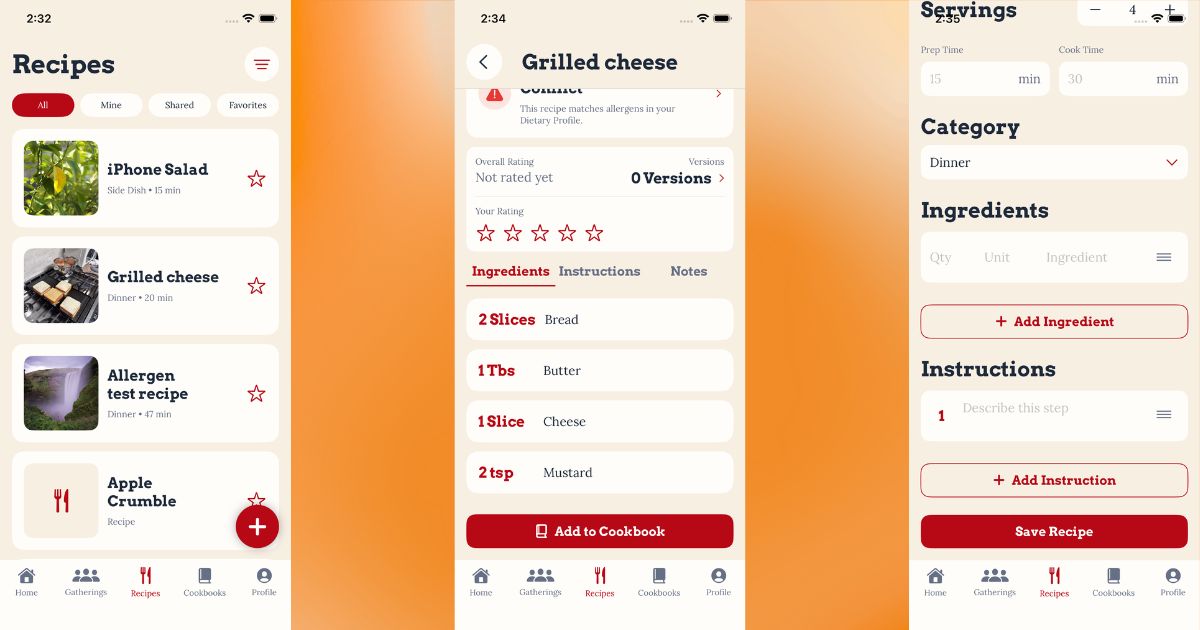
This sprint also brought the core recipe system in Kin Kitchen to life. Recipes are one of the foundations of the application, so this work covered everything from how recipes and ingredients are stored to how users actually interact with them.
Recipe and Ingredient Models
The Recipe and Ingredient models were created to establish the structure needed to store recipes and their individual ingredients. This gave the rest of the recipe functionality a consistent foundation to build on.
Recipe Service
A Recipe Service was added to handle communication between the application and Supabase. This keeps the database logic separate from the SwiftUI views and provides the functionality needed to create, retrieve, update, and delete recipes.
Recipe List
Users can now view their recipes through a dedicated Recipe List. This provides a central location for accessing the recipes they have created and navigating into individual recipe details.
Adding Recipes
The Add Recipe flow was completed, allowing users to create new recipes and enter the information needed to build them inside Kin Kitchen.
Recipe Details
A full Recipe Detail View was added so users can open an individual recipe and see its information rather than interacting with recipes only through a list.
Editing and Deleting Recipes
Recipes aren’t permanent once they’re created. Users can now return to an existing recipe, make changes, save those changes, or delete a recipe they no longer want.
Recipe Photos
Recipe photo uploads were also implemented. Users can add an image to their recipes, with the image stored through Supabase Storage and connected back to the appropriate recipe.
With these pieces completed, Kin Kitchen now has the core recipe lifecycle in place:
Create → View → Edit → Delete
Recipes can also include their own photos, giving us the foundation needed to start connecting the recipe system with the gathering and community features being built around it.
Building More Than an Allergen Checkbox
Making Recipes Dietary-Aware
One of the larger pieces of Kin Kitchen has been building the system that allows recipes to be checked against a user’s dietary information.
At first glance, this sounds simple:
Ingredient contains allergen → show warning.
The problem is that real food data is rarely that clean.
Ingredients can have different names, outside data can be incomplete, mappings can change over time, and an ingredient that has no known allergens is very different from an ingredient that simply has not been classified yet.
This milestone turned that problem into an actual system instead of a simple string comparison.
Step 1 — Ingredient Allergen Association
The first step was giving Kin Kitchen a reliable way to associate ingredients with known allergens.
The database now uses an ingredient catalog rather than depending entirely on whatever text a user enters into a recipe.
The supporting tables include:
ingredient_catalogingredient_aliasesingredient_catalog_allergensingredient_allergens
This gives us a normalized ingredient and allows multiple names to point back to the same ingredient.
For example:
flour→ Wheatsoy sauce→ Soycheese→ Milk
That gives the rest of the allergen system structured information to work with instead of guessing from raw recipe text.
Step 2 — Recipe Dietary Check
Once ingredients could be classified, the next step was comparing a recipe against the dietary profile of the person viewing it.
Kin Kitchen can now examine the ingredients in a recipe and determine whether any of them conflict with the user’s known allergens.
This moved the system from simply storing allergen information to actually using it during the recipe experience.
Step 3 — Allergen Warning Indicator
Knowing about a conflict in the backend doesn’t help anybody if the interface never tells them.
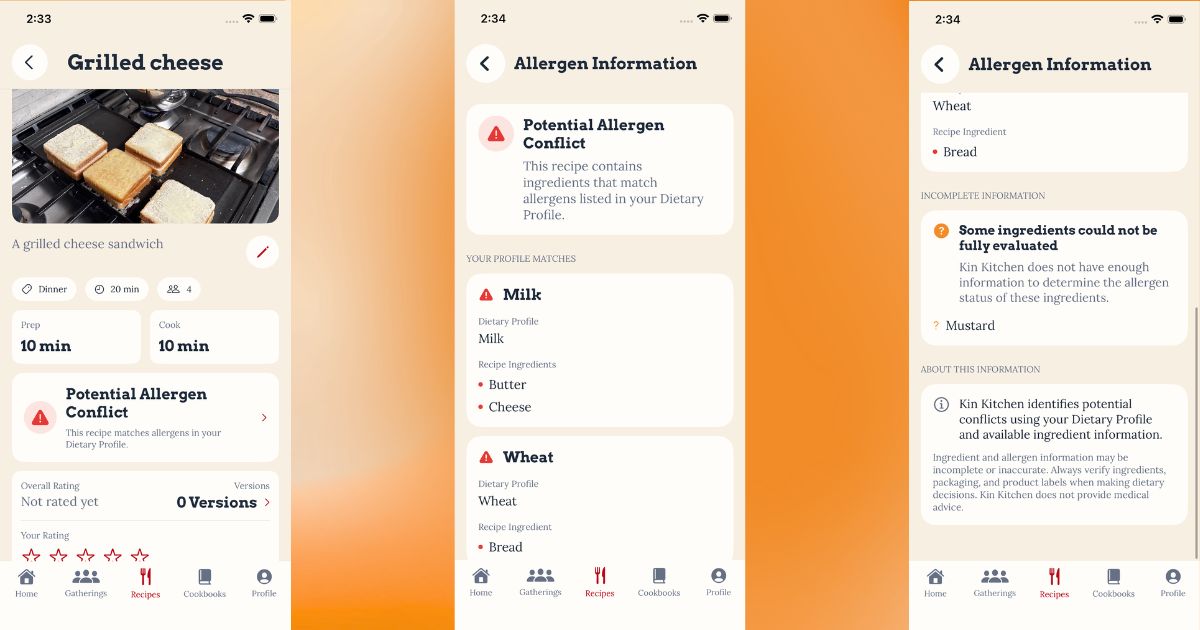
The Recipe Detail screen now displays a visible warning when Kin Kitchen identifies an allergen conflict.
The warning uses the existing Kin Kitchen design system and provides an obvious entry point into more detailed information instead of burying the result somewhere in the recipe data.
Step 4 — Allergen Warning Details
The warning itself was only part of the solution.
Users also need to know why they received it.
The allergen detail view now separates confirmed conflicts and identifies the ingredients responsible for them.
Instead of:
Warning: This recipe may be unsafe.
Kin Kitchen can provide useful context about what caused the warning.
Final Details — Unknown and Incomplete Information
This ended up being one of the most important parts of the milestone.
There is a major difference between:
We checked this ingredient and found no known allergen.
and:
We do not have enough information about this ingredient.
Treating those as the same thing would create a false sense of safety.
Kin Kitchen now distinguishes between:
- Confirmed allergen conflicts
- Classified ingredients with no known conflict
- Ingredients with incomplete or unknown allergen information
For testing, ingredients such as water could correctly be recognized as having no known allergen, while an intentionally unknown ingredient such as Greg's Special Sauce remained marked as incomplete.
That distinction makes the warning system much more trustworthy.
Keeping Ingredient Data Current
Another problem appeared once the catalog started working: What happens when our allergen information changes? If we improve the catalog later, recipes that were classified previously should not remain stuck using old information. To solve that, the allergen catalog now has its own version.
The database tracks the current version in:
allergen_catalog_metadata
Each classified recipe ingredient also stores the catalog version used when it was checked:
allergen_classification_version
When Kin Kitchen encounters an ingredient classified using an older catalog version, it can classify that ingredient again using the newer data.
This means improving the catalog doesn’t require manually rebuilding every recipe in the database.
Open Food Facts Integration
We also added Open Food Facts as an external data source during this milestone.
Open Food Facts helps expand the amount of food and allergen information available to Kin Kitchen without requiring us to manually maintain every possible ingredient or packaged food ourselves.
The important part is that external information is treated as another source of data rather than unquestionable truth.
If Kin Kitchen cannot confidently classify something, it remains incomplete instead of being automatically treated as safe.
Testing the System
The completed workflow was tested against several different ingredient states:
| Ingredient | Classification | Allergen Result |
|---|---|---|
| Flour | ⚠️ Conflict | Wheat |
| Soy Sauce | ⚠️ Conflict | Soy |
| Cheese | ⚠️ Conflict | Milk |
| Water | ✓ Known | No known allergen conflict |
| Greg’s Special Sauce | ? Incomplete | Unknown |
| Mustard | ? Incomplete | Intentionally unknown for testing |
These tests helped confirm that the system wasn’t only finding allergens—it was also correctly handling the absence of information.
The Bigger Lesson
This milestone started as “add allergen warnings.”
It ended up requiring:
- Ingredient normalization
- Aliases
- Allergen relationships
- User dietary comparison
- Warning indicators
- Warning detail views
- Incomplete-data handling
- External food data
- Catalog versioning
- Automatic reclassification
That is exactly why I have been documenting the development of Kin Kitchen. Features that look like a single checkbox on a project plan often turn into an entire interconnected system once you start asking what needs to happen for the feature to actually be reliable. With the allergen milestone completed, development has now moved into Gathering Management, where recipes, people, and shared meals begin coming together.
Gathering Management
The next major area of development focused on building Kin Kitchen’s gathering workflow.
Gathering Data Model & Supabase Service
A production Gathering model and service were added using Supabase.
Gatherings currently support:
- Name
- Theme
- Description
- Location
- Date and time
- Guest limit
- Status
- Host
- Cover image
- Created and updated timestamps
Gathering statuses currently include:
- Upcoming
- Completed
- Cancelled
Row Level Security was also configured so gathering access can be controlled based on the authenticated user.
Helper functions were added for checking whether a user is:
- The gathering host
- A gathering participant
This avoided recursive RLS policy problems when checking gathering membership.
Gathering Participation
Gathering participants can currently have invitation states such as:
- Pending
- Accepted
- Declined
The app converts those states into user-facing relationships:
- Hosting
- Going
- Invited
Declined gatherings are excluded from the user’s upcoming list.
Gatherings List
The Gatherings screen now uses real Supabase data instead of placeholder content.
The screen includes:
- Upcoming
- Hosting
- Past
Gathering cards display the gathering information and the user’s relationship to that event.
The list correctly handles:
- Gatherings hosted by the current user
- Accepted invitations
- Pending invitations
- Declined invitations
- Completed gatherings
Home Screen Integration
Upcoming gatherings are also loaded onto the Home screen.
The Home screen now displays real gathering data and uses the same Hosting, Going, and Invited relationship logic as the main Gatherings screen.
Add Gathering Flow
Users can now create gatherings directly from the app.
The creation flow includes:
- Gathering name
- Optional theme
- Date
- Time
- Location
- Description
- Optional gathering photo
The form validates that the gathering has a name and that the selected date and time are in the future.
After creation, the gathering is stored in Supabase and immediately appears in the Gatherings list.
Gathering Photos
Gathering cover photos are now stored in a dedicated private Supabase Storage bucket:
gathering-photos
The database stores the image path in:
cover_image_path
Images are uploaded under the authenticated user’s folder using a generated UUID filename.
This gives us the foundation for displaying gathering artwork on cards and on the Gathering Detail hero area.
Next Gathering Work
The Gathering Detail screen is currently being aligned with the approved Kin Kitchen mockup.
The target layout includes:
- Hero image
- Gathering title
- Host-only Edit control
- Date and time
- Location
- Status
- Details / Guests / Chat tabs
- Dish section for the upcoming meal sign-up workflow
The dish area is being established now so Sprint 2 functionality can be added without redesigning the gathering screen later.
Building the Dish Claiming System
The dish claiming system now allows participants to select a requested dish and commit to bringing it.
The system keeps track of:
- How many of each dish are needed
- How many have already been claimed
- How many are still available
- Who is contributing each dish
- How many dishes each participant has committed to bringing
For requests where multiple dishes are needed, participants can choose how many they want to contribute instead of the system assuming one person is responsible for the entire request.
The gathering screen was also updated to clearly display whether a dish is available, partially claimed, or completely claimed.
Editing and Removing Dish Claims
Claiming a dish also needed to be reversible.
Participants can now edit their own contribution after signing up. If someone originally volunteers to bring one dish and later decides they can bring two, they can update their quantity without removing the entire claim.
Likewise, they can reduce the number they are bringing.
Participants can also completely remove their claim. Once removed, that quantity immediately becomes available for another participant to claim.
An important part of this work was making sure users can only modify their own selections. Participants cannot change or remove another person’s contribution.
All of these changes persist through Supabase, so closing and reopening the application does not reset the gathering’s claim state.
Implementing Recipe Access During Gatherings
While testing the gathering workflow, I found another issue with recipes attached to requested dishes.
The host could attach a recipe to a dish request, but participants did not have permission to actually view the complete recipe.
This wasn’t a SwiftUI problem. Supabase Row Level Security was correctly protecting private recipes, but it did not yet understand that participating in a gathering should temporarily grant read access to a recipe being used for that gathering.
New read policies were added so that an authenticated user can view a recipe attached to a gathering when they are either:
- The gathering host
- An accepted participant in the gathering
This access is read-only. Being invited to a gathering does not give someone permission to edit or delete another user’s recipe.
The same access rules were extended to the recipe’s ingredients.
Recipe Photo Permissions
Recipe photos exposed another layer of the same problem.
Recipe images are stored separately in Supabase Storage, so allowing access to the recipe database record did not automatically allow participants to load its image.
The recipe photo storage policies were updated to recognize gathering participation as well.
This keeps private recipe photos protected while allowing accepted gathering participants to see the photo belonging to a recipe that has been intentionally attached to their gathering.
Security Still Matters
One of the important lessons from this work was that sharing information inside a gathering should not mean making that information public.
Kin Kitchen now distinguishes between ownership and temporary gathering access.
A participant may need to read a recipe because they are attending the gathering, but that does not mean they own that recipe.
The goal is to keep the system restrictive by default while granting the minimum access necessary for the gathering experience to work.
Sprint 3 Planning
With the basic gathering and dish coordination systems in place, planning has started for Sprint 3.
Sprint 3 will focus heavily on the community side of Kin Kitchen and is divided into three major feature areas.
Gathering Invitations
The gathering invitation system will include:
- Creating the gathering invitation model and service
- Searching for and selecting users
- Sending gathering invitations
- Accepting or declining invitations
- Displaying invitation status
- Displaying gathering participants
Dietary-Aware Recipe Sharing
Recipe sharing will begin connecting Kin Kitchen’s recipe system with the dietary information already stored for users.
The planned workflow includes:
- Creating the recipe sharing model and service
- Searching for a recipe recipient
- Retrieving the recipient’s dietary information
- Comparing a recipe against their dietary profile
- Warning the sender about potential dietary conflicts
- Reviewing the warning before completing the share
The goal isn’t simply to tell someone that a recipe was shared with them. Kin Kitchen should help identify whether that recipe may contain something that conflicts with the recipient’s dietary needs.
Gathering Notifications
The third major area will be notifications.
Planned functionality includes:
- Creating the notification model and service
- Building the notifications view
- Notifying users about gathering invitations
- Notifying hosts when invitations are accepted or declined
- Notifying participants when gathering information changes
- Tracking read and unread notifications
- Opening the appropriate gathering directly from a notification
Planning the Sprint
Sprint 3 is planned as a 40-hour development sprint.
The current workload is divided into:
- 10 hours — Gathering Invitations
- 13 hours — Dietary-Aware Recipe Sharing
- 11 hours — Gathering Notifications
- 6 hours — Regression testing
Dependencies were also mapped before development begins so that features are built in the correct order rather than simply working through the Jira board from top to bottom.
The invitation system needs to exist before invitation notifications can be generated. Invitation responses need to work before the host can be notified about those responses. Likewise, dietary information needs to be retrieved and evaluated before Kin Kitchen can display a meaningful warning during recipe sharing.
What’s Next?
Sprint 2 established much more of the interaction between gathering hosts and participants.
Sprint 3 will start connecting those systems together.
Instead of gatherings simply existing inside the application, users will be able to invite other people into them, communicate changes through notifications, and share recipes while taking the recipient’s dietary needs into consideration.
Kin Kitchen is continuing to move away from being just another place to store recipes.
The larger goal is still the same: build software around the way food actually connects families and communities.
We improve as we learn, Version 2 ideas queued for build next!
- Child Profiles created by parents to help identify allergents to party hosts.
- Recipe versions already modified to avoid allergens listed in the recipe view.
- Meal Train signups for communites who support others through hard times.
>_ discussion
Comments
Questions, thoughts, or a better way to solve the problem? Join the discussion.